Original: $2.40
-70%$2.40
$0.72The Story
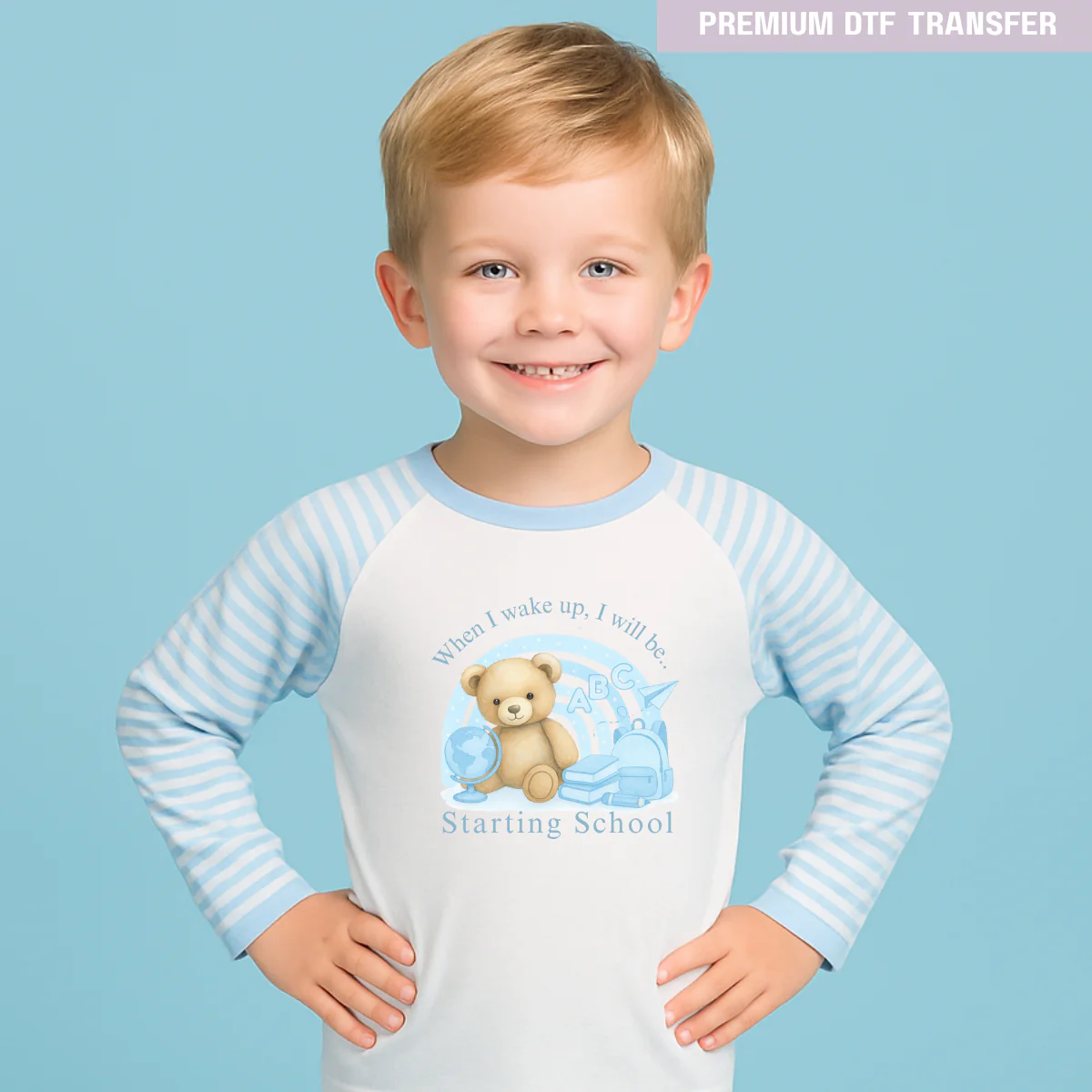
When i wake up I will be starting school blue bear - nursery - reception -year 1- year 2 - year 3 - year 4
Back to school range
• Choose your length size refer to the longest one
• Printed using professional equipment
Size suggestion
Baby - 3in - 5in
Toddler - 6in -8in
Teen - 8in - 10in
Adult T-shirt - A4 - 10in -12in
or you can choose the size base on your needs
Get Ready for a Bright New School Year!
Celebrate back-to-school season with our vibrant DTF transfers, designed to add fun, colour, and personality to your child’s school gear. Whether they’re heading to nursery, Year 1, Year 2, or beyond — we’ve got the perfect design to make their first day extra special.
Our transfers are ready to press and compatible with cotton, polyester, T-shirts, backpacks, lunch bags, pencil cases, and more. Just apply using a heat press or a household iron (with care) — it’s quick, easy, and built to last.
🎒 Perfect for:
• Back to Nursery
• First Day of School
• Year 1 or Year 2 welcome outfits
• Custom backpacks or lunch bags
• Milestone photo props
✨ Features:
-
Full-colour, premium print
-
Soft feel, stretchable & washable
-
Easy to apply at home or in-store
-
Made and shipped from the UK
🎁 Add custom names or class years to make it uniquely theirs — ideal for photos, gifts, or keeping school items personal and fun!
Transfer only, bag, tote bag , notebook not included , personalised not included
DTF Hot Peel Transfer - For fabric - Need heat press or Iron
Instructions Heat press (Cold Peel):
- Temperature: 160 degrees Celsius
- Time: 30 seconds
- Pressure: Heavy
- Allow to cool for 90 seconds
- Peel: Cold
- Place Teflon sheet over design
- 2nd press: 10 seconds
Cricut, Cricut Mini, and Household Iron (Cold Peel):
- Temperature: 160 degrees Celsius
- Time: 30 seconds
- Pressure: Heavy
- Peel: Let cool completely before peeling
- Place Teflon sheet over design
- 2nd press: 10 seconds
Tips for Transfers:
- When peeling the transfer:
- Set temperature to 160 degrees and ensure heavy pressure.
- Wait 60-90 seconds before peeling from one corner slowly.
- If transfer residue remains, re-press for 8-10 seconds and retry.
- If not sticking or peeling away, adjust pressure and re-press for 5-7 seconds.
- Repeat until the perfect setting is found.
- Once successful, apply the second transfer for 30 seconds using the determined pressure and adjusting based on heat press setting
We cannot assume responsibility for transfers that have been incorrectly pressed applied wrong. To avoid this issue, please ensure that you carefully press or apply
your wraps. Looking for something you don't see in our store? Email us and
we will be happy to help you
Before making a purchase, please take a moment to read through our terms and conditions.
Description
When i wake up I will be starting school blue bear - nursery - reception -year 1- year 2 - year 3 - year 4
Back to school range
• Choose your length size refer to the longest one
• Printed using professional equipment
Size suggestion
Baby - 3in - 5in
Toddler - 6in -8in
Teen - 8in - 10in
Adult T-shirt - A4 - 10in -12in
or you can choose the size base on your needs
Get Ready for a Bright New School Year!
Celebrate back-to-school season with our vibrant DTF transfers, designed to add fun, colour, and personality to your child’s school gear. Whether they’re heading to nursery, Year 1, Year 2, or beyond — we’ve got the perfect design to make their first day extra special.
Our transfers are ready to press and compatible with cotton, polyester, T-shirts, backpacks, lunch bags, pencil cases, and more. Just apply using a heat press or a household iron (with care) — it’s quick, easy, and built to last.
🎒 Perfect for:
• Back to Nursery
• First Day of School
• Year 1 or Year 2 welcome outfits
• Custom backpacks or lunch bags
• Milestone photo props
✨ Features:
-
Full-colour, premium print
-
Soft feel, stretchable & washable
-
Easy to apply at home or in-store
-
Made and shipped from the UK
🎁 Add custom names or class years to make it uniquely theirs — ideal for photos, gifts, or keeping school items personal and fun!
Transfer only, bag, tote bag , notebook not included , personalised not included
DTF Hot Peel Transfer - For fabric - Need heat press or Iron
Instructions Heat press (Cold Peel):
- Temperature: 160 degrees Celsius
- Time: 30 seconds
- Pressure: Heavy
- Allow to cool for 90 seconds
- Peel: Cold
- Place Teflon sheet over design
- 2nd press: 10 seconds
Cricut, Cricut Mini, and Household Iron (Cold Peel):
- Temperature: 160 degrees Celsius
- Time: 30 seconds
- Pressure: Heavy
- Peel: Let cool completely before peeling
- Place Teflon sheet over design
- 2nd press: 10 seconds
Tips for Transfers:
- When peeling the transfer:
- Set temperature to 160 degrees and ensure heavy pressure.
- Wait 60-90 seconds before peeling from one corner slowly.
- If transfer residue remains, re-press for 8-10 seconds and retry.
- If not sticking or peeling away, adjust pressure and re-press for 5-7 seconds.
- Repeat until the perfect setting is found.
- Once successful, apply the second transfer for 30 seconds using the determined pressure and adjusting based on heat press setting
We cannot assume responsibility for transfers that have been incorrectly pressed applied wrong. To avoid this issue, please ensure that you carefully press or apply
your wraps. Looking for something you don't see in our store? Email us and
we will be happy to help you
Before making a purchase, please take a moment to read through our terms and conditions.